Developing Documentation Pages
Docusaurus used markdown[md] to develop documentation. In your project you will see a folder named docs this is where we will save all our md files.
Organizing project
Docusaurus folders for organizing the documentation each folder inside docs folder servers as a group of documents. We can utilize this to create a multi nested documentation.
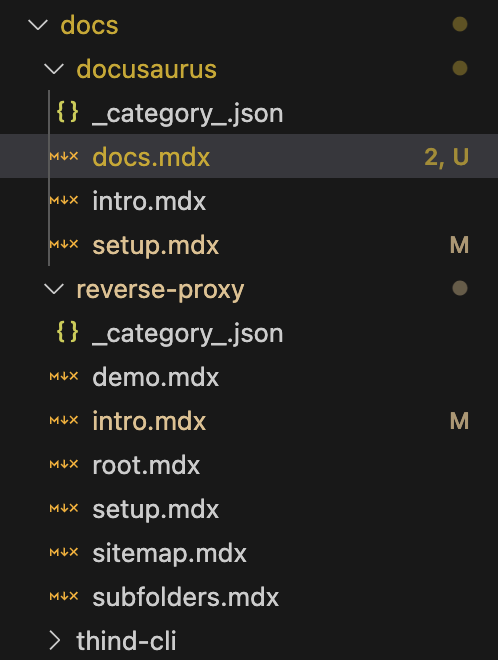
These folders would be rendered in the following format in HTML
Adding new pages
- Docs
- Blog
1. Create a new file
Add new file with .mdx extension in docs folder or any sub folder inside docs . The name of this file will be used as slug.
2. Add page details
Add the following content to your mdx file.
---
title: PAGE_NAME
description: PAGE_DESCRIPTION_FOR_SEO
sidebar_position: 3
---
This will create a new page with the title PAGE_NAME and description PAGE_DESCRIPTION_FOR_SEO in the sidebar at position 3 in the folder structure.
3. Add content
Use MDX syntax to add content to your page. You can use MDX to add images, code blocks, tables, etc. Refer to this mardown cheatsheet for more information.
1. Create a new file
Add new file with .mdx extension in blog folder. Use the following format for the file name YYYY-MM-DD-SLUG_FOR_PAGE.mdx. The will help you organize your blog posts by date. Read more here
2. Add page details
Add the following content to your mdx file.
---
slug: SLUG_FOR_PAGE
title: TITLE_FOR_PAGE
authors: [COMMA_SEPARATED_AUTHORS]
tags: [COMMA_SEPARATED_TAGS]
---
This will create a new blog with the title PAGE_NAME and description PAGE_DESCRIPTION_FOR_SEO in the sidebar at position 3 in the folder structure.
3. Add content
Use MDX syntax to add content to your page. You can use MDX to add images, code blocks, tables, etc. Refer to this mardown cheatsheet for more information.